Rust実装を動的ライブラリ化してPython/Juliaパッケージとして公開する
1. まえがき
これは 総研大 統計科学コース Advent Calendar 2025 3日目の記事です. 企画して頂いた とりさん をはじめ,一緒に企画を盛り上げてくれている皆さん,ありがとうございます.
さて 総研大アドベントカレンダー 2025 に引き続き本日2本目ですが, こちらでは Rust実装をPython/Juliaラッパーする ことをしたいと思います.
2. 背景
はじめにML系の国際学会において,私が個人的に思っていることを2つ挙げたいと思います.
まず1つ目に,ML系の国際学会の投稿要件には 再現性 の記述が含まれており,ソースコードも補足資料へ含めることが推奨されています. 採択論文の多くはGitHubリポジトリへのリンクが記述されているため,一見すると再現性が担保されているように見えます. しかしながら公開されているソースコードの少なくない割合が適切な作法に則っていないため,開発時と同じ環境構築が難しいことが多々あります.
2つ目は1つ目と関連しますが,適切な作法に則っていないため第三者からすると,公開されているコードの使い方がわかりにくいことがあります. これは利用者としても不便ですが,開発者としても意図しない比較をされる可能性があるため望ましくありません.
...という方便のもと,この記事では直近の研究で取り組んだ,手法公開のためのパッケージ作りの事をまとめます.
-
Rust実装の動的ライブラリ化
-
Pythonからのアクセス方法とパッケージ化
-
Juliaからのアクセス方法とパッケージ化
- 想定読者
-
プログラミングに多少慣れている方
- 実行環境
-
NixOS 25.05, cargo 1.91.1, uv 0.7.22, Julia 1.10.9
3. 事前知識
本題に入る前にいくつか事前知識を記載しておきます.
- 動的ライブラリ
-
Linuxであれば
.so, MacOSであれば.dylib, Windowsであれば*.dllという拡張子のファイルで,プログラム実行時に読み込まれます.実行プログラム(ここでいうPythonやJuliaプログラム)には「このライブラリが必要だよ」という情報のみ含まれている事が特徴です.静的ライブラリはコンパイル時に実行プログラムへ組み込まれるという点が異なります. - Pythonパッケージ公開の仕組み
-
PyPI(Python Package Index) というリポジトリへパッケージをアップロードすることにより
pip install <package name>でインストールできるようになります. - Juliaパッケージ公開の仕組み
-
General Registry と呼ばれるGitリポジトリへ,パッケージのメタ情報(パッケージ本体がどこに置かれているかやバージョン情報等)をプルリクエスト & マージされることで
Pkg.add("<package name>")でインストールできるようになります.
PyPIの場合はアップロードしたパッケージを削除することで検索結果から消すことができますが, JuliaのGeneral Registryの場合,一度マージされるとそのメタ情報は基本的に消せないという違いがあります.
したがって本記事では 作成したPythonパッケージをPyPIへ登録する ところまで行いますが, Juliaのパッケージでは,後はGeneral Registryへ登録するだけ というところで止めることにします.
4. 本題
それでは全体的な流れの説明をします.ここではコアアルゴリズムをRustで実装し, その関数をPython/Juliaから呼び出せるようにします.開発する順番としては,
-
Rustのコアアルゴリズムを実装
-
Pythonからのアクセスとパッケージ化
-
Juliaからのアクセスとパッケージ化
という流れで着手します.コアアルゴリズムは今回の興味の対象外なので簡単な関数を実装します. またPython→Juliaの順番には明確な理由があり,Rust↔Pythonの連携は容易に実現可能なクレートが提供されています. そのフォーマットに準拠したうえでJulia実装を行うのが 現状最も安定した開発ができる と思われます.
また全体はモノリポジトリ,つまり単一のGitリポジトリでRust/Python/Juliaコードのすべてを管理します. 色々な良し悪しがありますが,小規模の範囲では連携の手間が減ります.
最終的な完成コードは 私のリポジトリ に置いてあります.
4.1. Rustでのコアアルゴリズムの実装
Rust↔Pythonの連携に関しては既に PyO3/maturin というツールが提供されているため,
これを利用するのが現状最も良いです. PyO3 はRustでPythonの型を扱ったり,Rustで書いた関数やモジュールを
Pythonのそれに対応付けたりするためのクレートであり, maturin はRustとPythonの連携を容易にする環境設定を提供し,
ビルドやパッケージ化を支援するツールです.
maturin のインストール方法はドキュメントに記述されているのでそちらを参照していただくとして,
早速実装に移りましょう.ここでは keishis_sandbox というライブラリ名にします.
PyPIへのパッケージのアップロードにおいて,パッケージ名はリポジトリ全体で一意でなければならないため,
そのことを考慮して名前を決めてください.
> maturin new -b pyo3 keishis_sandboxコアアルゴリズムの内容は今回の趣旨ではないため,ここでは簡単のために
2つの整数を受け取り,足し算した値を返す関数 _mysum を実装して,
Python/Juliaから呼び出せるようにします.
fn _mysum(a: i64, b: i64) -> i64 {
    a + b
}
また自動生成されるファイルにはGitHub ActionsのCI/CD設定も含まれていますが, この段階で動作されても困るので一部修正しておきます.
on:
    #   push:
    #     branches:
    #       - main
    #       - master
    #     tags:
    #       - '*'
    #   pull_request:
    workflow_dispatch:

...
4.2. Pythonからのアクセスとパッケージ化
先程の関数をPythonから呼び出せるようにします. pyo3を使う場合,Pythonコードを全く書かず,Rustコード単体でもPythonモジュールを作成することができます. 例えば コード 3 のように記述すれば コード 4 の流れで呼び出すことができます.
use pyo3::pymodule;

fn _mysum(a: i64, b: i64) -> i64 {
    a + b
}

#[pymodule]
mod keishis_sandbox {
    use super::_mysum;
    use pyo3::prelude::PyResult;
    use pyo3::pyfunction;

    #[pyfunction]
    fn mysum(a: i64, b: i64) -> PyResult<i64> {
        Ok(_mysum(a, b))
    }
}> uv sync
> maturin develop
> source .venv/bin/activate
> python
>>> import keishis_sandbox
>>> keishis_sandbox.mysum(1,2)
34.2.1. Pythonでのラッピング
ML系であれば複雑な入力データを扱いたい状況が多々ありますが, その処理をすべてRustに投げるのはRust側のコードが煩雑になる原因です. またRustコードはJuliaとも共有化することを考慮すると,入力データをPython/Julia側で整形し, 必要な情報のみをRust側に渡すのが望ましく,その場合,最終的なパッケージの形成は 先程のようにRust側で完結するのではなく,Pythonコードで行うのが良いでしょう.
そこで mkdir ./python/keishis_sandbox でPythonパッケージのディレクトリを作成したうえで
コード 5 のように pyproject.toml を編集します.この編集には以下の目的があります.
-
頒布用のPythonパッケージのコードが
pythonディレクトリにあることを指定 -
Rustでビルドされたモジュールの名称を
_keishis_sandboxという名称でkeishis_sandbox以下に配置することを指定 -
バインディング方式として
pyo3を指定
[build-system]
requires = ["maturin>=1.10,<2.0"]
build-backend = "maturin"

[project]
name = "keishis_sandbox"
requires-python = ">=3.8"
classifiers = [
    "Programming Language :: Rust",
    "Programming Language :: Python :: Implementation :: CPython",
    "Programming Language :: Python :: Implementation :: PyPy",
]
dynamic = ["version"]

[tool.maturin] # <- ADDED
python-source = "python"
module-name = "keishis_sandbox._keishis_sandbox"
bindings = "pyo3"
モジュール名を _keishis_sandbox へ変更することを コード 6
のように明示的に src/lib.rs へ記述します.
...

#[pymodule]
#[pyo3(name = "_keishis_sandbox")] // <- ADDED
mod keishis_sandbox {
    use super::_mysum;
    use pyo3::prelude::PyResult;
    use pyo3::pyfunction;

    #[pyfunction]
    fn mysum(a: i64, b: i64) -> PyResult<i64> {
        Ok(_mysum(a, b))
    }
}
あとは通常のパッケージ作成のように ./python/keishis_sandbox/__init__.py をコード 7 のように記述したうえで
コード 8 を実行すると動作確認できます.
これでRustで作った関数を内包しつつ,Pythonコードも内包したパッケージが作成できました.
from ._keishis_sandbox import mysum


def mysub(a: int, b: int) -> int:
    return a - b


__all__ = ["mysub", "mysum"]> maturin develop
> source .venv/bin/activate
> python
>>> import keishis_sandbox
>>> keishis_sandbox.mysum(1,2)
3
>>> keishis_sandbox.mysub(1,2)
-14.2.2. 頒布前の整理1: 型情報の追加
エディタによっては __init__.py の from ._keishis_sandbox import … で未解決シンボルの警告が出ているかもしれません.
これを修正するためにまず コード 9 のように型情報ファイルを作成し,
touch python/keishis_sandbox/py.typed で空のマーカーファイルを置くことで型情報のサポートを明示します.
def mysum(a: int, b: int) -> int: ...4.2.3. 頒布前の整理2: パッケージのメタ情報整理
pyproject.toml に記載するメタ情報を整理しますが,
確定で修正していただきたいのは [project.version] の部分です.
デフォルトでは dynamic = ["version"] になっており,これは Cargo.toml の
バージョン情報を参照する形になっています.しかしRustによるコアアルゴリズムのバージョンと
Pythonパッケージの情報は分けたほうがよいため,ここでは version="x.x.x" で直接バージョン指定します.
また今回,PyPIへのアップロードはGitHub Actionsを介して行うため, [project.urls]
でリポジトリ情報を記載します.
その他の項目については私も慣れていないため,適宜有名なPythonパッケージの書き方を参考にしてください. 最終的には コード 10 のようになりました.
[build-system]
requires = ["maturin>=1.10,<2.0"]
build-backend = "maturin"

[project]
name = "keishis_sandbox"
version = "0.1.0"
requires-python = ">=3.13"
description = "test package for KeishiS"
readme = "README.md"
keywords = ["rust", "python", "julia"]
maintainers = [
  {name = "Keishi Sando", email = "sando.keishi.sp@alumni.tsukuba.ac.jp"}
]

[project.urls]
repository = "https://github.com/KeishiS/keishis_sandbox"

[tool.maturin]
python-source = "python"
module-name = "keishis_sandbox._keishis_sandbox"
bindings = "pyo3"
4.2.4. 頒布前の整理3: PyPIの準備
以前は .pypirc ファイルにトークン情報を格納してローカルからアップロード,みたいな事をしてましたが,
最近はGitHub Actionsから直接アップロードできるようになったのでそちらを利用します.
-
PyPI のアカウントページから Publishing タブを開く
-
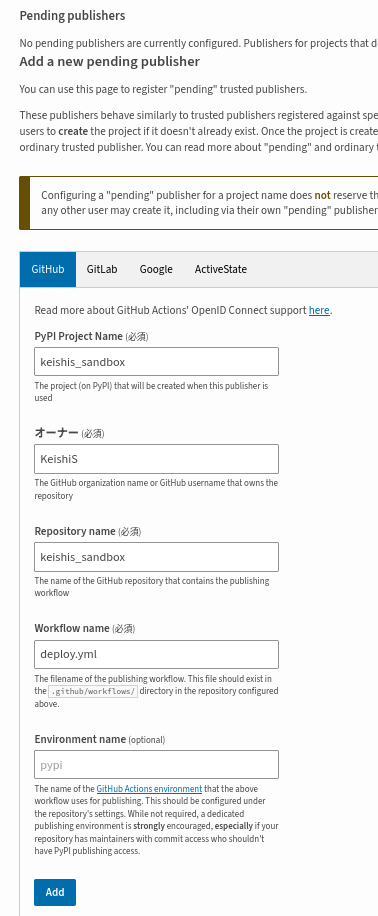
Pending Publisher セクションで必須項目の入力を行って Add ボタンを押下
これで該当のGitHub Actionsからアップロードできるようになります.
4.2.5. 頒布用のGitHub Actions設定
最後にGitHub Actionsの設定を行います.基本的に自動生成されたものを利用しますが, 以下の点を修正します.
-
Rust/Python/Juliaそれぞれでバージョンのタグ分けをしたいので,Pythonのパッケージ更新の際は
py-v0.1.0のフォーマットを利用 -
初期状態だと色んなコンパイル環境(ubuntu/windows/mac, x86_64/x86/arm/etc…)がありますが,一般的な環境に絞る
ということを考慮して コード 11 という形になります.
name: deploy

on:
    push:
        tags:
            - "py-v*"
    pull_request:
    workflow_dispatch:

permissions:
    contents: read

jobs:
    linux:
        runs-on: ${{ matrix.platform.runner }}
        strategy:
            matrix:
                platform:
                    - runner: ubuntu-24.04
                      target: x86_64
                    - runner: ubuntu-24.04-arm
                      target: aarch64
        steps:
            - uses: actions/checkout@v4
            - uses: actions/setup-python@v5
              with:
                  python-version: 3.x
            - name: Build wheels
              uses: PyO3/maturin-action@v1
              with:
                  target: ${{ matrix.platform.target }}
                  args: --release --out dist --find-interpreter
                  sccache: ${{ !startsWith(github.ref, 'refs/tags/') }}
                  manylinux: auto
            - name: Upload wheels
              uses: actions/upload-artifact@v4
              with:
                  name: wheels-linux-${{ matrix.platform.target }}
                  path: dist

    windows:
        runs-on: ${{ matrix.platform.runner }}
        strategy:
            matrix:
                platform:
                    - runner: windows-latest
                      target: x64
        steps:
            - uses: actions/checkout@v4
            - uses: actions/setup-python@v5
              with:
                  python-version: 3.x
                  architecture: ${{ matrix.platform.target }}
            - name: Build wheels
              uses: PyO3/maturin-action@v1
              with:
                  target: ${{ matrix.platform.target }}
                  args: --release --out dist --find-interpreter
                  sccache: ${{ !startsWith(github.ref, 'refs/tags/') }}
            - name: Upload wheels
              uses: actions/upload-artifact@v4
              with:
                  name: wheels-windows-${{ matrix.platform.target }}
                  path: dist

    macos:
        runs-on: ${{ matrix.platform.runner }}
        strategy:
            matrix:
                platform:
                    - runner: macos-15-intel
                      target: x86_64
                    - runner: macos-15
                      target: aarch64
        steps:
            - uses: actions/checkout@v4
            - uses: actions/setup-python@v5
              with:
                  python-version: 3.x
            - name: Build wheels
              uses: PyO3/maturin-action@v1
              with:
                  target: ${{ matrix.platform.target }}
                  args: --release --out dist --find-interpreter
                  sccache: ${{ !startsWith(github.ref, 'refs/tags/') }}
            - name: Upload wheels
              uses: actions/upload-artifact@v4
              with:
                  name: wheels-macos-${{ matrix.platform.target }}
                  path: dist

    sdist:
        runs-on: ubuntu-latest
        steps:
            - uses: actions/checkout@v4
            - name: Build sdist
              uses: PyO3/maturin-action@v1
              with:
                  command: sdist
                  args: --out dist
            - name: Upload sdist
              uses: actions/upload-artifact@v4
              with:
                  name: wheels-sdist
                  path: dist

    release:
        name: Release
        runs-on: ubuntu-latest
        if: ${{ startsWith(github.ref, 'refs/tags/') || github.event_name == 'workflow_dispatch' }}
        needs: [linux, windows, macos, sdist]
        permissions:
            # Use to sign the release artifacts
            id-token: write
            # Used to upload release artifacts
            contents: write
            # Used to generate artifact attestation
            attestations: write
        steps:
            - uses: actions/download-artifact@v4
            - name: Generate artifact attestation
              uses: actions/attest-build-provenance@v2
              with:
                  subject-path: "wheels-*/*"
            - name: Publish to PyPI
              if: ${{ startsWith(github.ref, 'refs/tags/') }}
              uses: PyO3/maturin-action@v1
              with:
                  command: upload
                  args: --non-interactive --skip-existing wheels-*/*
これで頒布の準備ができましたので,GitHubリポジトリにpushして, タグを付与してやればGitHub Actionsが動作し,PyPIへのアップロードが行われます(コード 12).
> git tag -a py-v0.1.0 -m "first deploy"
> git push origin py-v0.1.0一般に公開されたかはまっさらな環境でコード 13のように確認してください.
> uv init check && cd check
> uv add keishis-sandbox # パッケージ名だとunderlineはハイフンになるので注意
> source .venv/bin/activate
> python
>>> import keishis_sandbox
>>> keishis_sandbox.mysum(1,2)
3
>>> keishis_sandbox.mysub(1,2)
-1
4.3. Juliaからのアクセスとパッケージ化
今回のように動的ライブラリをJuliaから呼び出すようなパッケージを作りたい時, 王道は BinaryBuilder を利用することだと思います. しかしこちらも一度登録すると削除が難しいため,今回はビルドした動的ライブラリをGitHubリポジトリへアップロードし, Juliaパッケージをインストールした際はそれをダウンロードするという形を取ります.
4.3.1. Python向けビルドとJulia向けビルドの分離
Julia向けのビルドにPythonの情報は不要なのでそのあたりの整理を行います.具体的には以下の通りです.
-
featureフラグによるJulia/Python向けの切り替え(
src/lib.rsとCargo.toml) -
featureフラグ付与によるPythonのデプロイ修正(
.github/workflows/deploy.ymlとpyproject.toml)
[package]
name = "keishis_sandbox"
version = "0.1.0"
edition = "2024"

# See more keys and their definitions at https://doc.rust-lang.org/cargo/reference/manifest.html
[lib]
name = "keishis_sandbox"
crate-type = ["cdylib"]

[features]
default = ["python", "julia"]
python = ["pyo3"]
julia = []

[dependencies]
pyo3 = { version = "0.27.0", features = ["extension-module"], optional = true }#[cfg(feature = "python")]
use pyo3::pymodule;
fn _mysum(a: i64, b: i64) -> i64 {
a + b
}
#[cfg(feature = "python")]
#[pymodule]
#[pyo3(name = "_keishis_sandbox")]
mod keishis_sandbox {
use super::_mysum;
use pyo3::prelude::PyResult;
use pyo3::pyfunction;
#[pyfunction]
fn mysum(a: i64, b: i64) -> PyResult<i64> {
Ok(_mysum(a, b))
}
}...
- name: Build wheels
uses: PyO3/maturin-action@v1
with:
target: ${{ matrix.platform.target }}
args: --release --out dist --find-interpreter --no-default-features --features python
sccache: ${{ !startsWith(github.ref, 'refs/tags/') }}
manylinux: auto
......
version = "0.1.1"
...これで一回pushして,パッケージの更新が適切に行われるか確認してください.
4.3.2. Julia向けのコード追加
src/lib.rs へJulia向けのコードを追記します.
...

#[cfg(feature = "julia")]
#[unsafe(no_mangle)]
pub extern "C" fn mysum(a: i64, b: i64) -> i64 {
    _mysum(a, b)
}
4.3.3. GitHub Releaseでの動的ライブラリ配布
.github/workflows/rust-deploy.yml を新たに作成し,Julia向けの動的ライブラリをGitHub Releaseへアップロードするようにします.
name: Rust Deploy
on:
    push:
        tags:
            - "rs-v*"
    pull_request:
    workflow_dispatch:

permissions:
    contents: read

env:
    PKG_NAME: keishis_sandbox

jobs:
    linux-macos:
        name: Build for Linux and macOS
        strategy:
            matrix:
                platform:
                    - runner: ubuntu-24.04
                      target: x86_64-unknown-linux-gnu
                      arch: x86_64
                      os: linux
                      dlext: so
                    - runner: ubuntu-24.04-arm
                      target: aarch64-unknown-linux-gnu
                      arch: aarch64
                      os: linux
                      dlext: so
                    - runner: macos-15-intel
                      target: x86_64-apple-darwin
                      arch: x86_64
                      os: macos
                      dlext: dylib
                    - runner: macos-15
                      target: aarch64-apple-darwin
                      arch: aarch64
                      os: macos
                      dlext: dylib
        runs-on: ${{ matrix.platform.runner }}
        steps:
            - uses: actions/checkout@v4
            - name: Install Rust
              uses: dtolnay/rust-toolchain@stable
            - name: Cargo Build
              run: cargo build --release --target ${{ matrix.platform.target }} --target-dir target --no-default-features --features julia
            - name: Archive Build
              run: cd target/${{ matrix.platform.target }}/release && tar -zcvf target-${{ matrix.platform.os }}-${{ matrix.platform.arch }}.tar.gz lib${{ env.PKG_NAME }}.${{ matrix.platform.dlext }}
            - name: Upload Cargo Target
              uses: actions/upload-artifact@v4
              with:
                  name: target-${{ matrix.platform.os }}-${{ matrix.platform.arch }}
                  path: target/${{ matrix.platform.target }}/release/target-${{ matrix.platform.os }}-${{ matrix.platform.arch }}.tar.gz
    windows:
        name: Build for Windows
        strategy:
            matrix:
                platform:
                    - runner: windows-2025
                      target: x86_64-pc-windows-msvc
                      arch: x86_64
                      os: windows
                      dlext: dll
                    - runner: windows-11-arm
                      target: aarch64-pc-windows-msvc
                      arch: aarch64
                      os: windows
                      dlext: dll
        runs-on: ${{ matrix.platform.runner }}
        steps:
            - uses: actions/checkout@v4
            - name: Install Rust
              uses: dtolnay/rust-toolchain@stable
              with:
                  targets: ${{ matrix.platform.target }}
            - name: Cargo Build
              run: cargo build --release --target ${{ matrix.platform.target }} --target-dir target --no-default-features --features julia
            - name: Rename dll file
              run: cd target\${{ matrix.platform.target }}\release && ren ${{ env.PKG_NAME }}.${{ matrix.platform.dlext }}  lib${{ env.PKG_NAME }}.${{ matrix.platform.dlext }}
            - name: Archive Build
              run: cd target\${{ matrix.platform.target }}\release && tar -zcvf target-${{ matrix.platform.os }}-${{ matrix.platform.arch }}.tar.gz lib${{ env.PKG_NAME }}.${{ matrix.platform.dlext }}
            - name: Upload Cargo Target
              uses: actions/upload-artifact@v4
              with:
                  name: target-${{ matrix.platform.os }}-${{ matrix.platform.arch }}
                  path: target\${{ matrix.platform.target }}\release\target-${{ matrix.platform.os }}-${{ matrix.platform.arch }}.tar.gz
    release:
        name: Release
        runs-on: ubuntu-latest
        if: ${{ startsWith(github.ref, 'refs/tags/') }}
        needs: [linux-macos, windows]
        permissions:
            contents: write
        steps:
            - uses: actions/download-artifact@v4
            - name: Upload Release Assets
              uses: svenstaro/upload-release-action@v2
              with:
                  repo_token: ${{ secrets.GITHUB_TOKEN }}
                  tag: ${{ github.ref }}
                  file_glob: true
                  file: target-*/*
                  draft: true
                  body: "This is a draft."
これが成功すればGitHub Releaseにドラフトが生成されるので,適当なタイトルと説明を記述して公開してください. tar.gzファイルが添付されているのでこれにJuliaパッケージからアクセスします.
4.3.4. Juliaパッケージの作成とArtifactの設定
それではJuliaパッケージの作成に着手しましょう. (@v1.10) pkg> generate keishis_sandbox でパッケージの雛形を作ります.
そのうえでわかりやすさのためにディレクトリ名を mkdir keishis_sandbox julia にしておきます.
> julia次に,ビルドした動的ライブラリをArtifactとして管理するための準備をします.
(keishis_sandbox) pkg> add Artifactutils Artifacts Libdl で必要なパッケージを追加したうえで,
Artifact登録用のスクリプトを以下のように作成します.
using ArtifactUtils, Pkg.BinaryPlatforms

const tag = "rs-v0.1.3"
const artifacts_toml = joinpath(@__DIR__, "..", "Artifacts.toml")
const artifact_name = "keishis_sandbox"
const base_url = "https://github.com/KeishiS/keishis_sandbox/releases/download/$(tag)"

const targets = [
    Dict(:ARCH => "x86_64", :OS => "linux", :FILE => "target-linux-x86_64.tar.gz"),
    Dict(:ARCH => "aarch64", :OS => "linux", :FILE => "target-linux-aarch64.tar.gz"),
    Dict(:ARCH => "x86_64", :OS => "macos", :FILE => "target-macos-x86_64.tar.gz"),
    Dict(:ARCH => "aarch64", :OS => "macos", :FILE => "target-macos-aarch64.tar.gz"),
    Dict(:ARCH => "x86_64", :OS => "windows", :FILE => "target-windows-x86_64.tar.gz"),
    Dict(:ARCH => "aarch64", :OS => "windows", :FILE => "target-windows-aarch64.tar.gz")
]

for target in targets
    filename = "target-$(target[:OS])-$(target[:ARCH]).tar.gz"
    url = "$(base_url)/$(filename)"

    ArtifactUtils.add_artifact!(
        artifacts_toml,
        artifact_name,
        url;
        platform=Platform(target[:ARCH], target[:OS]),
        force=true
    )
end
これを使って julia --project=. deps/gen_artifacts.jl を実行すれば
julia/Artifacts.toml が作成されます.
4.3.5. パッケージの中身作成
あとは src/keishis_sandbox.jl で提供する関数を定義します.
module keishis_sandbox

using Libdl, Artifacts

export mysum

const PKG_NAME = "keishis_sandbox"
const artifact_root = @artifact_str"keishis_sandbox"
const lib = joinpath(artifact_root, "lib$(PKG_NAME)." * Libdl.dlext)

function mysum(a::Int, b::Int)::Int
    return ccall((:mysum, lib), Int, (Int, Int), a, b)
end

endこれをコード 23で動作確認してみましょう.
問題なければ git push しておきます.
> julia --project=.
julia> using keishis_sandbox
Precompiling keishis_sandbox finished.
  1 dependency successfully precompiled in 1 seconds. 27 already precompiled.

julia> mysum(1,2)
3